

You want to check later what Claude Code did while you left it working
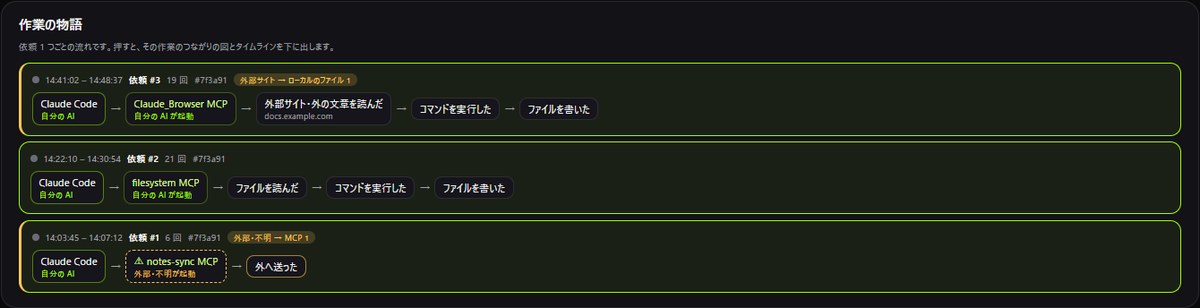
Each request becomes one line: which MCP it used, whether it read outside sites, ran commands and wrote files. Click one to see that work's connections map and timeline.
AI ACTIVITY MAP
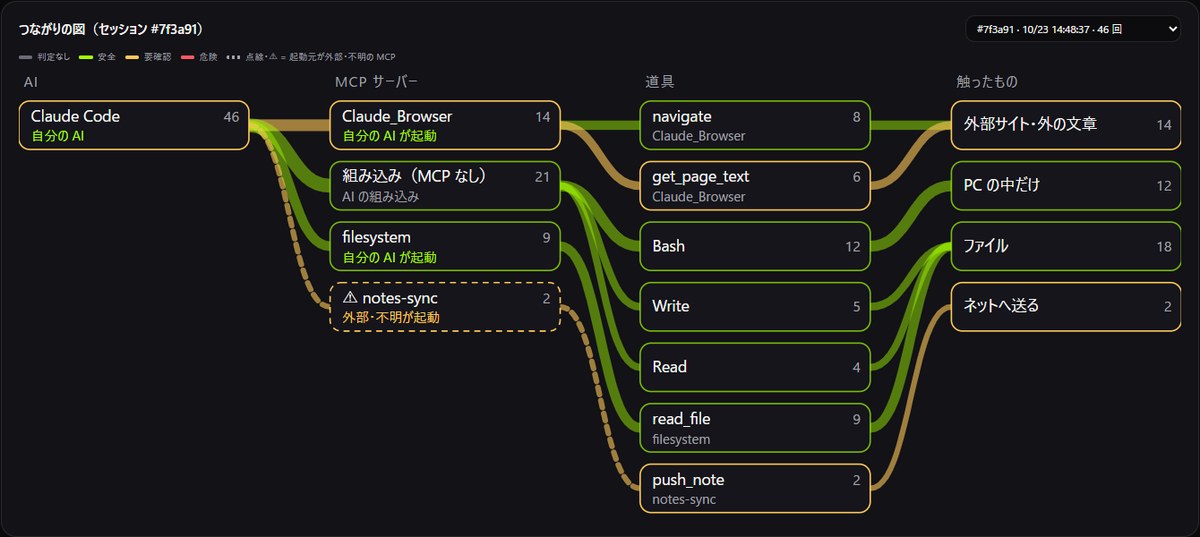
See the work you handed to Claude Code as one flow per request (Claude Code → MCP → read outside sites → ran commands → wrote files) and as a connections map: AI → MCP server → tool → touched. Viewing it is free, and the records stay on this PC.
SCENES
Each request becomes one line: which MCP it used, whether it read outside sites, ran commands and wrote files. Click one to see that work's connections map and timeline.
Each MCP server gets a label: Started by your AI, or Started from outside / unknown. Outside or unknown ones are drawn with a dashed line and ⚠, so they stand out in the map too.
The classic prompt-injection pattern is: read outside text, then run or send what it says. NEXORIA counts boundary crossings such as Outside site → local file first, and shows each site read by its landing host and the number of instruction-like lines.
WHAT HAPPENS
MECHANISM
Boundary crossings (outside site → local file, secret → sent out, outside / unknown → MCP, writes / deletes outside the work folder), a story for each request, the connections map, recent calls and a timeline. ▲ marks where secrets, outside text and sending out all came together.
It uses the records AI Brake keeps through Claude Code's hooks, plus PC Watch's records of MCP servers starting. Right now it records Claude Code with the NEXORIA hook installed.
Paths, file names, URLs and command contents are never shown (only kinds and counts). For outside sites it keeps only the landing host and a summary (language, length, number of instruction-like lines). Excerpts of text read are kept for 14 days only if you turn that setting on (off by default).
PRIVACY
HONEST
PRICING
After that, Pro is ¥980/month (1 PC) and Small Team is ¥2,980/month (up to 5 PCs). Your decision history and settings stay available even after your plan ends.
QUESTIONS
In the app, open AI guard → AI activity on the left. It is built from the records when you open the screen, so nothing keeps running in the background.
Viewing AI Activity is free. Starting PC Watch, which is used to tell who started an MCP server, needs a plan or the free trial.
No. Only the kind of action, how many times, and the judgement. Paths, file names, URLs and command contents never appear on screen or in the records.
DOWNLOAD
The first 10 days from sign-up are free. You can check the installer's SHA-256 (NX2026.10.22.v37 / approx. 61.7 MB) in the download section.