

You installed XAMPP for practice and left it there
It checks in seconds whether an old PHP is still on your PC. It does not run php.exe; it only reads the file's version information.
PHP GUARD
NEXORIA looks for PHP installed with XAMPP, Laragon, WAMP and similar tools, and checks for free whether it is a version affected by PHP2Shell, the critical flaw disclosed in October 2026. If it finds one, you can apply a temporary mitigation with one click, also free. The complete fix is updating to a patched version.
SCENES
It checks in seconds whether an old PHP is still on your PC. It does not run php.exe; it only reads the file's version information.
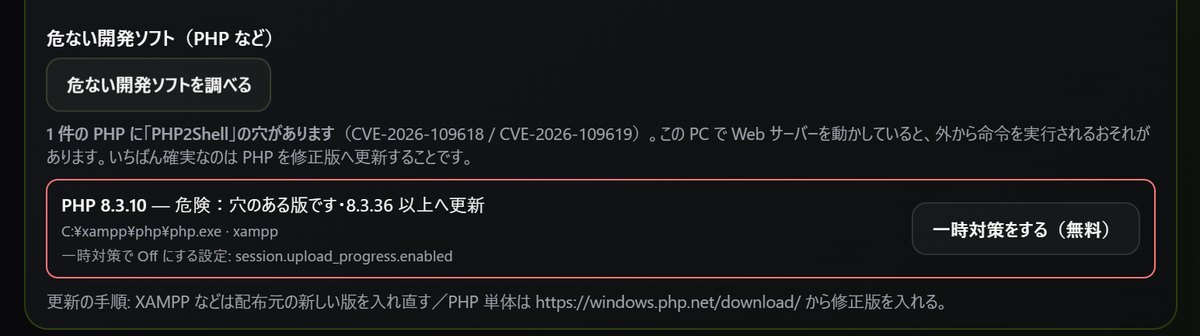
If the version is vulnerable, it shows Danger and lists the fixed versions (8.5.12 / 8.4.27 / 8.3.36 / 8.2.35). PHP 8.1 and earlier will not get a fix, so it recommends moving to a newer version.
The free temporary mitigation sets session.upload_progress.enabled to Off in php.ini (one of the mitigations listed by the PHP project; on 8.5 it also turns fatal_error_backtraces Off). It copies the original file before changing anything, so you can always undo it.
It also finds running PHP and Apache processes, and if they can be reached from other devices it tells you to deal with it soon.
WHAT HAPPENS
MECHANISM
The install locations of C:\xampp, C:\php, Laragon, WAMP, MAMP, Herd, Local, Scoop, winget and Chocolatey; XAMPP and similar folders at the root of each drive; IIS settings; php.exe on your PATH; and PHP or Apache processes running right now.
It reads the version information of the php.exe file and compares it with the PHP project's fixed versions (8.5.12 / 8.4.27 / 8.3.36 / 8.2.35). It does not run php.exe.
It sets session.upload_progress.enabled to Off in php.ini (for WAMP, also in Apache's config file). Afterwards the status reads "Temporarily mitigated — update still needed." The PHP project says there is no complete mitigation and that updating is the only safe option, so you still need to update. It takes effect after you restart your web server (Apache, etc.).
PRIVACY
HONEST
PRICING
After that, Pro is ¥980/month (1 PC) and Small Team is ¥2,980/month (up to 5 PCs). Your decision history and settings stay available even after your plan ends.
QUESTIONS
If you don't run PHP on your PC, this issue doesn't affect you. It mainly affects servers. After big news like this, also watch out for fake emails that try to take advantage of it.
Finding and mitigating PHP2Shell is part of NEXORIA's free features.
No. The mitigation only closes off specific attack paths. Be sure to update to a fixed version.
DOWNLOAD
The first 10 days from sign-up are free. You can check the installer's SHA-256 (NX2026.10.22.v37 / approx. 61.7 MB) in the download section.